Logging in with Mobile BankID on a phone goes like this: you tap "Open BankID" in the browser, the BankID app opens, and you identify yourself. Then, by default, you are left in the BankID app, and you have to go back to the browser yourself. Not a nice experience. We wanted LogEze to bring the user back to the browser without that extra step.
The return URL
When you start a BankID order you can give BankID a returnUrl. When the user is done in the app,
BankID opens that URL, and the user is back in the browser. Ours is
https://www.logeze.se/#/login/bankid/return/<nonce>, where the nonce, a value used for this one login only, lets the page find the
order again.
On Android the user lands in the tab they started in, logged in, the way you would hope. We do not even send a return URL there.
On an iPhone it does not. BankID's return opens a new tab. The tab you started in is still there, frozen by iOS while you were in BankID, and still waiting. The new tab could finish the login on its own, so nothing was broken, but after a few logins you had a row of LogEze tabs, some logged in and some not, which was confusing.
So the iPhone needed some extra dance moves to bring the user back to the tab they started in. This post covers what we tried, what did not work, what we ended up shipping, and what we still do not understand.
What other sites do
Some don't try. Länsförsäkringar sends no return URL at all: you switch back yourself with the small "Safari" link in the top left corner, and you land in your own tab.
Some do, and succeed. Skatteverket brings you back to the tab you started in, and so does Handelsbanken, through the same BankID app on the same phone. So the problem was solvable, and something about our setup was different.
What the web said
Not much that was official. An unanswered Apple developer forum post from 2018 says Safari reuses a tab when the
URL it is asked to open equals the tab's URL, or differs only in the fragment. BankID's own sample client builds
its return URL as the current page plus a fragment, window.location.href + '#initiated=true', and a
comment in the same file admits that some iOS browsers still open a new tab.
What we tried
We worked in production on a real iPhone, with Safari's Web Inspector attached from a Mac and a handful of event
listeners pasted into the console: hashchange, pagehide, pageshow and
visibilitychange. Every attempt below ended with two tabs.
-
Launching BankID through
https://app.bankid.com/?autostarttoken=…instead ofbankid:///?autostarttoken=…. Handelsbanken does this on iOS, and so does BankID's sample. We kept it, since it is BankID's recommendation, but it did not change the tab. -
Removing the fragment from the tab's address with
history.replaceStateright before the launch, so the return URL was "the tab's URL plus a fragment", exactly the forum post's rule. - Setting the tab's address to exactly the return URL, nonce and all.
- Stopping every timer in the original tab, so it sat as idle as Handelsbanken's page does while BankID is open.
The original tab's console told the same story every time: visibilitychange to hidden when BankID
opened, and never visible again.
The same URL from another app
To take BankID out of the picture we put links in the Notes app and tapped them while a LogEze tab was open.
Safari reused the tab every time, including for the exact pair we use, #/login/bankid in the tab and
#/login/bankid/return/test from Notes. Safari's history showed that BankID opened our return URL
unchanged. So Safari kept the tab when Notes opened the URL and opened a new one when BankID did. We have not found
out why.
What Handelsbanken does
Their logon page is public, so we read its script. It sends its own backend
/logon/se/corp/sv/mbidqr/#authenticate as the redirect, the return arrives as a fragment with an id
and a link to finish the login, and the page handles it both in the same tab and in a new one. While BankID is
open the page does nothing at all. If you come back to it without the fragment, it tells you that you seem to be
using a different browser. Structurally that is what we do. We could not find the difference that matters.
What we shipped
Two observations made a workaround possible. First, Safari lets a script close a tab that another app opened,
while it refuses for the tab you started in ("Can't close the window since it was not opened by JavaScript").
Second, the original tab is alive but suspended while you are in BankID. A BroadcastChannel ping from
the new tab reached it after 90 seconds, far too late to ask "are you there?".
So the tab that launches BankID leaves a small marker in localStorage: the order's nonce and the
time. Not in sessionStorage, since that belongs to one tab, and the new tab cannot read what the
original tab stored there. When BankID's return opens a new tab, that tab looks for a marker with its nonce. A
fresh one means the login started in another tab of this browser, so the new tab removes the marker and calls
window.close(). Safari shows the original tab, which collects the finished order when it becomes
visible and logs the user in. Without a marker, or with a stale or corrupt one, the new tab stays and finishes the
login itself, as before. The marker is written only on an iPhone that gets a return, and lives no longer than the
BankID order, three minutes.
Here is the whole dance on an iPhone, from the first tap to the login. The return tab and its
window.close() are the iPhone part. On a desktop, or with BankID on another device, there is no
return tab, and the original tab polls until BankID reports the order complete.
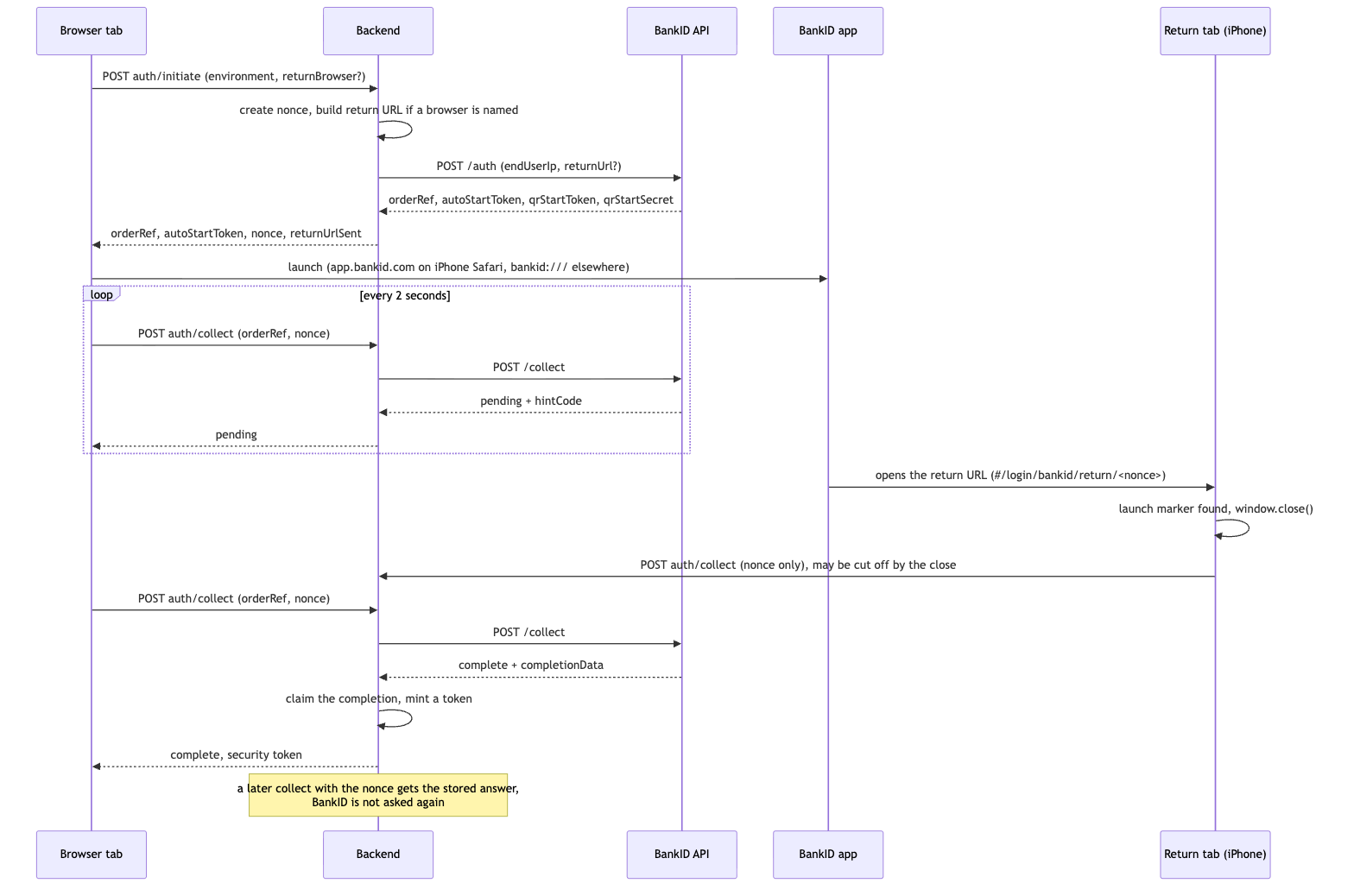
The result is one tab. Sometimes you see the second one for a moment before it closes.
Firefox and Chrome
Firefox and Chrome on an iPhone have the same problem, and one more. An https return URL opens in
Safari, whatever browser you started in, so a Firefox user ended up logged in to Safari, with the Firefox tab
still waiting. BankID has to be given a URL that opens the right app. For Firefox that is
firefox://open-url?url=<the https URL, encoded>, and for Chrome
googlechromes://<host>/#/login/bankid/return/<nonce>. The page tells the backend which
browser it runs in, from the user agent, and the backend builds the URL from a short list it knows. A browser that
is not on the list gets no return URL, and the user switches back by hand.
Both browsers open the return in a new tab too, like Safari. Both let that tab close itself, so the marker trick works unchanged and every browser ends in one tab.
Two tabs collecting the same order showed a bug we had not seen in Safari, where the extra tab closes too fast to notice. When the user cancelled in BankID, the first tab to ask got the cancel, and the other one was told "pending" until the order expired. The backend now remembers how an order failed and gives the same answer to anyone who holds its nonce.
A tab that closes itself mid-request
After the change we noticed crashes, all the same: Early EOF while reading the body of a collect
request. The new tab calls window.close() and sends one last collect as it goes. Sometimes
the tab is gone before the request body has reached the server, and the server reads half a request. Firefox did
it in two runs out of seven, Chrome in one out of seven, Safari never in our runs.
Nothing was broken for the user, the original tab finished the login on its own. But a half-read request ended up as a server error. Now a client that goes away before its request is read gets a 400 instead.
This is a workaround
We hide the symptom. The cause, why BankID's return opens a new tab for us and not for Handelsbanken, is still
unknown. The workaround also depends on Safari allowing that window.close(), which we observed rather
than found documented. If a future iOS stops allowing it, users are back to two tabs, both logged in, which is
where we started and not a broken login.
If you know what makes Safari reuse the tab, we would like to hear it.